
Overview
Arsenal's visual editor for structuring mods and generating manifest.json.
The Mod Builder is Arsenal's integrated development environment for creating Helldivers 2 mod packs. It provides a visual interface for structuring mods, managing options, and generating the required manifest files.
Legacy builder
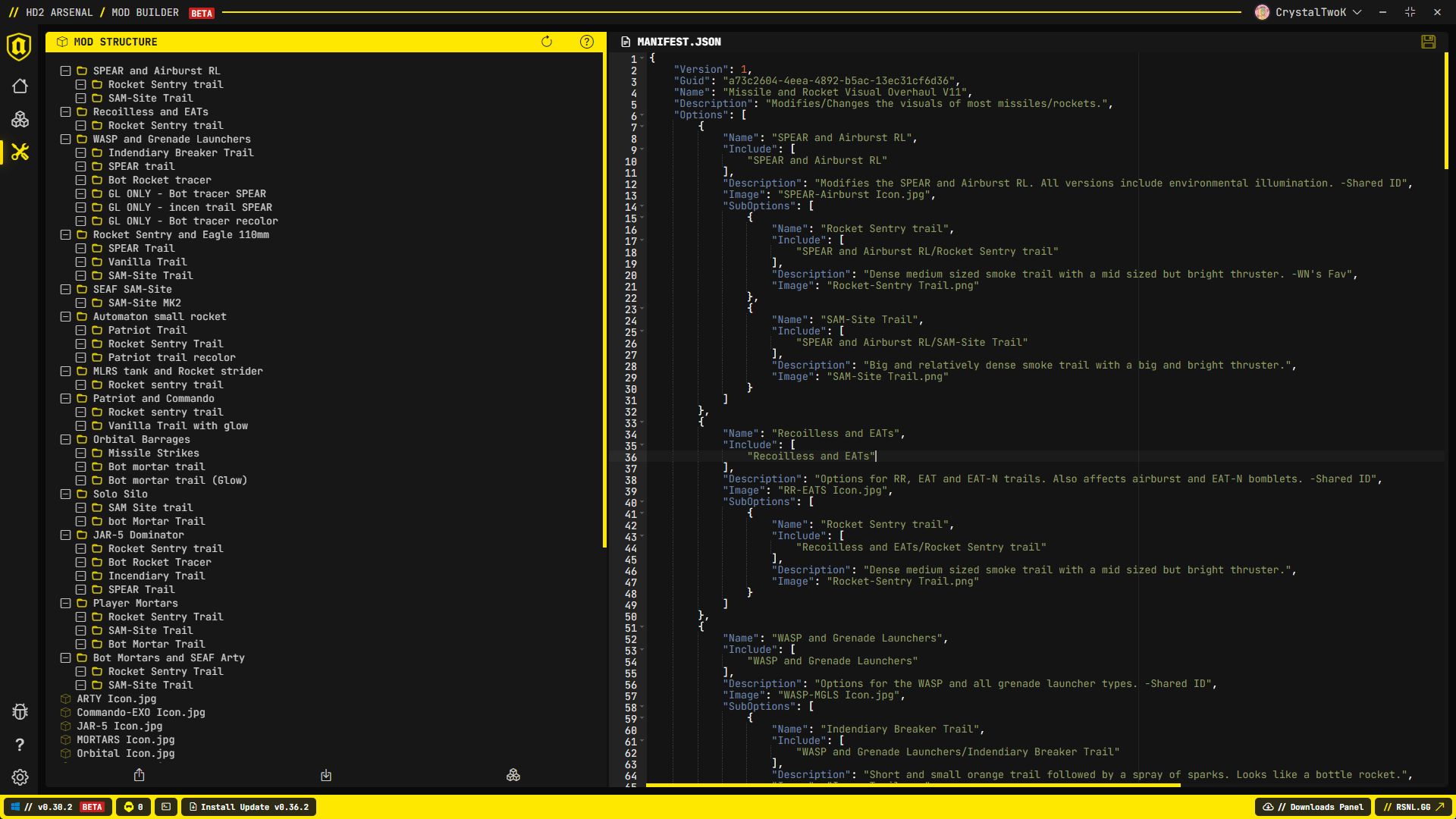
This section describes the Mod Builder in Arsenal 0.30.2 and earlier, where folders are options and the right panel is a JSON editor. Switch the sidebar version menu to Current, or open the current Mod Builder.
Important
This documentation covers Arsenal's Mod Builder, which helps you generate the manifest.json file needed for mods to work correctly with Arsenal and Helldivers 2 Mod Manager. If you want to actually create Helldivers 2 mods (textures, models, animations, etc.), you need to follow the Helldivers 2 Modding Wiki.
Key Feature
The Mod Builder's main advantage is its automatic manifest generation. When you add folders or subfolders to your project structure, the Mod Builder automatically generates and updates the corresponding manifest.json code. This eliminates the need to manually write the entire manifest file, making mod creation much faster and less error-prone.
Interface Layout
The Mod Builder is divided into two main panels:
Left Panel - Mod Structure
A tree view displaying your mod's folder structure:
- Folders - Represent mod options
- Subfolders - Represent sub-options
- Files - Patch files and images
- manifest.json - Auto-generated and updated based on folder structure
Right Panel - Manifest Editor
A JSON editor for the manifest.json with:
- Syntax highlighting
- Real-time validation
- Line numbers
- Save status indicator
Toolbar Actions
| Button | Icon | Description |
|---|---|---|
| New Project | Refresh | Reset to blank project |
| Learn More | Question | Open in-app short documentation |
| Export | Upload | Save as .hd2a_project file |
| Import | Download | Load existing project |
| Build | Boxes | Generate final ready-to-use mod pack |
Context Menus
Right-click different areas for context-specific actions:
On File Explorer Background:
- Add Folder
- Add Files
- Set Mod Icon
Keyboard Shortcuts
| Shortcut | Action |
|---|---|
Ctrl + S | Save manifest changes |